• Hamster Pups on Day 7

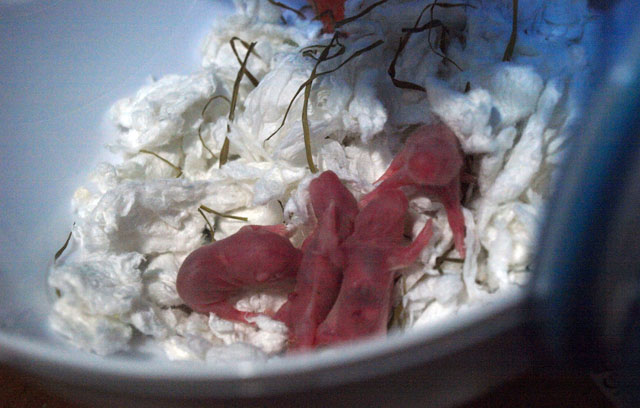
    Nothing much changed. They still sleep all day and look like tiny little sausages, though tiny little hairs and ears have grown.

    Hamsters sleeping, day 7.
    Hamsters sleeping, day 7.

    They’ve begun grooming themselves and eating some food. Hopefully in two days’ time they’ll wander around the cage so I can play with them!

  • Opteka 500mm Mirror Lens First Tests

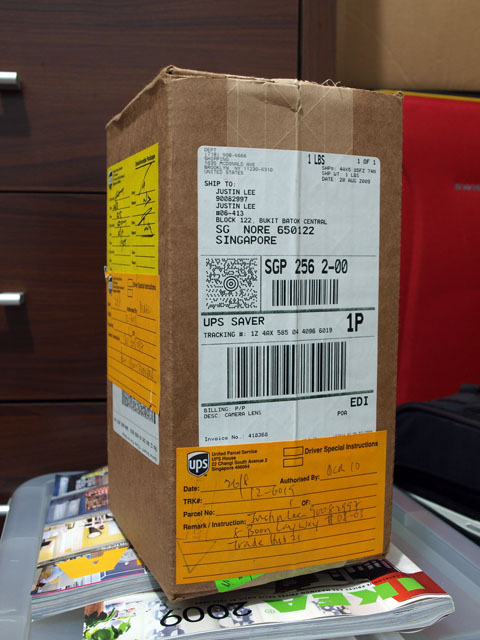
    I bought a cheap Opteka 500mm mirror lens off eBay and the UPS package finally arrived on Wednesday after two days of failed delivery attempts. Hooray!

    500mm in a box.
    500mm in a box.

    (more…)

  • The Wife Shall Shop Alone

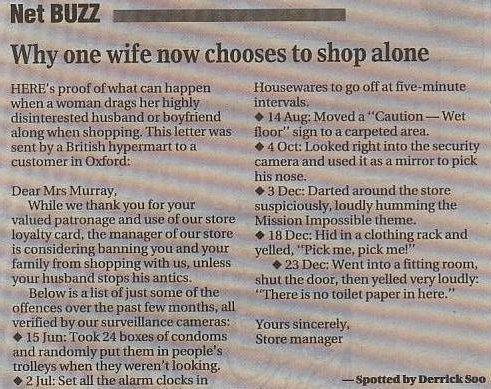
    Why one wife now chooses to shop alone
    Why one wife now chooses to shop alone

    I shall try it someday.

  • Ten simple steps to Skype over 3G on the iPhone

    Skype prevented users from making calls over 3G data networks on the iPhone for contractual reasons, but I think many would love to have it working. Here’s a summarized version of getting Skype to work on the iPhone.

    I’ve tested it on the 2G and it seems to work, though voice call quality is choppy.

    The pre-requisite here is to have a jailbroken iPhone with Cydia installed, and also knowledge of basic UNIX command line and the VI editor.

    If you do not have a jailbroken iPhone, do not ask for instructions here. You should find them online elsewhere.

    1. Install or update to the latest version of MobileSubstrate via Cydia. This fixes a crash on Skype.
    2. Install VoIP3G via Cydia. This enables you to make VoIP calls via 3G.
    3. Install SSH and VIM Enhanced via Cydia. You will need this to edit some files in your phone.
    4. Connect to a Wi-Fi network, preferably the same network as your computer.
    5. Get the phone’s IP address under Settings > Wi-Fi.
    6. SSH to the phone as root with the password alpine (this is the iPhone default if you haven’t changed it).
    7. Go to /Library/MobileSubstrate/DynamicLibraries and edit VoIPover3G.plist.
    8. You will see a line that looks like the following…
      Filter = {Bundles = ("com.Fringland.Fring");};
    9. Appened “com.skype.skype” to the array (it might already be there), e.g.
      Filter = {Bundles = ("com.Fringland.Fring", "com.skype.skype");};
    10. Save the file, restart your iPhone, and reinstall Skype.
  • Little Hamsters!

    Our female hamster gave birth to a litter of seven pups on the morning of Aug 22, 2009! The pups are 3 days old now and mummy hamster just happened to carry them over to somewhere else where I could take some good shots.

    Baby hammie looking up with no eyes.
    Baby hammie looking up with no eyes.

    (more…)

  • A new MacBook battery from eBay

    Look what the postman brought over the weekend in a very nicely wrapped package. No tapes, just ropes. Neat!

    Nicely wrapped package.
    Nicely wrapped package.

    (more…)