Tag: Firewall

  • The Beauty of CLI

    While Apple has successfully proven to the world that a well designed Graphical User Interface (GUI) can indeed provide better user experience, the beauty of a good Command Line Interface (CLI) shouldn’t be forgotten either.

    A GUI works well in consumer environments (e.g. SOHO routers), but enterprises and service providers work a little differently.

    I work in a service provider environment and have seen quite a fair bit of “high end” technology products. (These are usually appliance or black box hardware, like firewalls, routers, load balancers, DPIs, etc.) My observation is that while a lot of them have a great solution to an engineering problem, they actually create a management problem. Why? Because of the lack of a proper CLI or a proper management tool.

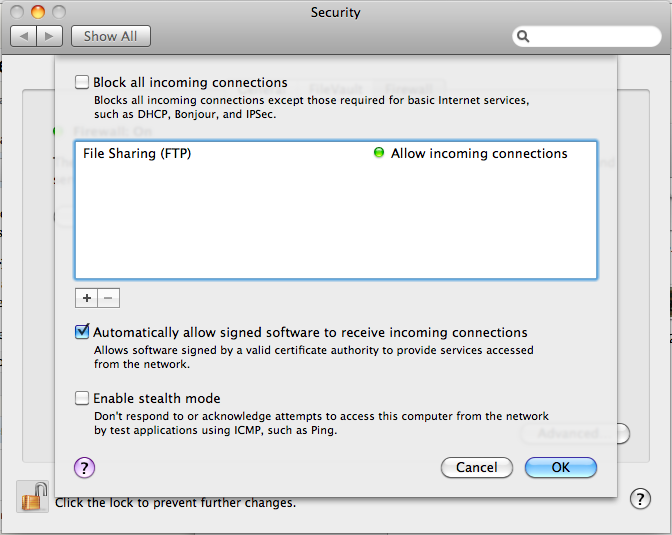
    There’s only so much a GUI can do to manage something as complicated as, say, a firewall. Check out the screenshots below taken from Mac OS X and Windows XP. They’re surprisingly complicated and not exactly useful. FYI, clicking on the [+] button on the Mac brings you to a file browser; I was expecting a form with IP address, port numbers and protocols.
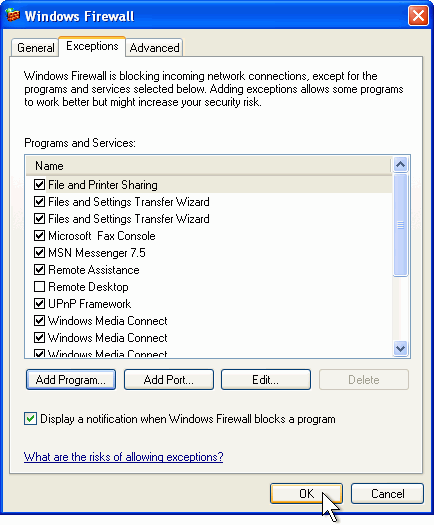
    Windows XP Firewall Configuration
    Mac OS X Firewall Configuration

    So, how do I add a rule to allow my custom app running on UDP port 15,233? How do I tell the firewall to stop processing further rules if I see a certain TOS marked packet? These aren’t use cases for consumer firewalls, but in enterprises, rules like these are very common.

    Firewalls are actually simple examples of GUI gone wrong. However, there are way more complicated devices than firewalls around, such as load balancers, DPIs and all sorts of routing gear. The problem gets multiplied many folds when there are tens, hundreds or even thousands of these configurations to manage on multiple machines.

    While a fancy GUI gets you through a sales pitch with the higher management folks, it’s really a PITA for the guys (like me) running the show. There’s a certain beauty in CLIs that GUIs cannot emulate. One if them is duplication. It is extremely difficult to duplicate mouse clicks and menu navigation, not to mention getting around errors. Imagine you have 1,000 Windows XP machines. You need to add a new firewall rule to allow your users to access a new mail server. Without Active Directory, you’d have one hell of a time… clicking.

    The other pain of working in enterprise datacenters is the lack of remote access (thanks to NAT and VPN crap) or an actual monitor console. Many engineers run around with a laptop and a RS232 serial cable. That’s all that’s needed to manage a device on the run.

    So if you’re going to build something for the enterprise, particularly appliances/black box devices, please focus some effort on building a proper CLI or centralized management. Learn from the experts – there’s a reason why guys like Cisco, Juniper and Extreme are industry leaders.

  • Hardening Linux and Apache Servers for DDoS

    In my earlier entry I discussed an interesting topic on firewalls and why we don’t need them. I put a small LAMP server to the test and got my results.

    Attack Information:

    • Type: TCP SYN flood
    • Max performance: 26Kpps (8Mbps)
    • Source IP Spoofing: Yes

    Victim A Specifications:

    • VMware Guest on a Single Core Opteron 1.8GHz Sun X2100
    • CentOS 4.x + Apache 2.x
    • 768MB RAM
    • Tuned (see below)

    Here’s what I’ve added to tune the Linux TCP stack in /etc/sysctl.conf:


    net.ipv4.tcp_abort_on_overflow = 1
    net.ipv4.tcp_fin_timeout = 15
    net.ipv4.tcp_low_latency = 1
    net.ipv4.tcp_syncookies = 1
    net.ipv4.tcp_max_syn_backlog = 2048
    net.ipv4.tcp_synack_retries = 3
    net.ipv4.tcp_sack = 0
    net.ipv4.ip_conntrack_max = 65535
    net.core.rmem_max = 16777216
    net.core.wmem_max = 16777216
    net.ipv4.tcp_rmem = 4096 87380 16777216
    net.ipv4.tcp_wmem = 4096 65536 16777216
    net.ipv4.ip_local_port_range = 1024 65000
    net.ipv4.tcp_keepalive_intvl = 15
    net.ipv4.tcp_keepalive_probes = 4
    net.ipv4.tcp_keepalive_time = 1800

    Here’s what I’ve added to the top of my iptables configuration in /etc/sysconfig/iptables as well:


    -N SYN
    -A SYN -m limit --limit 20/s --limit-burst 50 -j RETURN
    -A SYN -j DROP
    -A INPUT -p tcp --syn -j SYN

    * Note: During my testing, I added a log entry before dropping the packet as this floods the logs and kills the CPU and I/O so I highly discourage doing so.

    I repeated the same test on another VM running in a much more powerful Dell 2850 and with no modifications to the kernel or iptables.

    Victim B Specifications:

    • VMware Guest on a 2 x Dual Core Xeon 3.2GHz Dell 2850
    • CentOS 5.x + Apache 2.x
    • 256MB RAM
    • No Tuning

    Results:

    • Victim A held up to 16Kpps SYN flood (approx 5Mbps) but slowed down a little
    • Victim A held up to respond at 26Kpps SYN flood (approx 8Mbps) but was extremely slow
    • Victim B held up to 26Kpps SYN flood (approx 8Mbps) and did not slow down at all

    At this point in time, I couldn’t generate any more SYN packets as I lacked the hardware to do so, but it has given some conclusive results that a reasonably powerful LAMP hardware could take on modest DDoS attacks if configured correctly. I would expect a bare metal hardware with decent CPU performance to hold up much much more than what I’ve tested.

    Time to ditch that firewall!

  • Being Ignorant About DDoS and Why Firewalls Suck

    I’ve just attended a one day “seminar” with folks at Arbor Networks and it has been insightful.

    It seems people are still pretty ignorant about DDoS attacks. Unlike the 1999 CIH virus that was programmed to take out a computer by corrupting it’s BIOS EEPROM, most of the viruses, worms, malwares and whatnots on the Internet today are around for one simple reason – money. Obviously if you’re good enough to write worms, you’d think “why write a worm for fun, when I can make money?” These worms infect computers to build Botnets, and Botnets are sold for real money on the black market to take down sites (via a DDoS), send spam, and all sorts of other things.

    There was one point in particular though that caught my attention, and it was that firewalls (or in fact any type of inline device such as load balancers) are potentially targets for DDoS attacks. To make matters worse, the higher the OSI layer the firewall capability goes, the worse it gets in terms of performance and reliability.

    Believe it or not, firewalls are vulnerable to serious security issues like buffer overflows just like any other server or appliance with an IP address. So it turns out that firewalls are the biggest marketing scam in the history of IT security because companies have spent millions and millions of dollars on these stuff that don’t offer much protection than say, iptables.

    Just about a month ago, I spoke to one of our customers who experienced a DDoS attack launched towards their co-location in the USA. The DDoS traffic was approximately 500Mbps and it completely took out the firewall. This site provided online payment services to customers and was up and down for days. Their firewall was tiny in comparison to the DDoS they got – on paper specs states performance capabilities of 90Mbps or 30Kpps at 2.8K sessions/sec with a max of 8K sessions at any time. Of course, these are lab specifications and real world traffic wouldn’t be as forgiving.

    A simple DDoS attack that’s merely 10Mbps in traffic volume would have generated millions of packets per second with a 1-byte  UDP or ICMP packet. Taking down such a firewall would be a breeze. In fact, a single modern day computer on a broadband connection could probably do the job.

    If it was a TCP SYN flood, it would have been way easier. Sending 2K TCP SYN packets per second is child’s play, so filling the firewall’s state table really takes no more than 10 seconds.

    I had a chat with my wife who audits financial institutions (FIs) based on the PCI-DSS standard. Most FIs providing payment card services will have to conform to this standard. This standard, however, mandates that a firewall is required to comply. Unfortunately, most FIs have a pretty average Internet connectivity pipe – somewhat in the range of 20Mbps to 100Mbps. They scale their firewalls to their connectivity, so what they have, well, closely resembles the one I described earlier.

    So why were firewalls invented?

    Early operating systems didn’t provide packet filtering capabilities, so the early firewalls were really just stateless packet filters that basically routed (not NAT’ed) traffic and dropped unwanted requests based on simple IP, protocol and port numbers to services that weren’t supposed to be public. Then the idea of NAT came about (remember the days of WinRoute) to allow multiple computers on a LAN to share a single IP address on a WAN link. Some smart guy then figured, “oh well, let’s put servers on a private subnet and use the NAT technology to map public and private address spaces. This way, we’re safer!” Agreeably, that was the dumbest idea ever and is a PITA to manage, but millions of servers are configured this way today. Over time, these features were slowly incorporated into the all-in-one junkbox we now call the Firewall. Sweet.

    Personally, I don’t have a firewall sitting in front of my servers. All my servers are individually configured to run iptables (or ipfilter on Solaris, etc.). I am going to test the Linux TCP stack with Apache from a default CentOS install to see how much SYN flood it can hold up before giving up and maybe post some results here, including what I tweaked in the kernel.