Category: Technology

  • Modding the Armaggeddon MKA-2C keyboard

    I had this keyboard sitting around the house for a while and decided to modify it – specifically, change the switches to a silent one so I can use it in an office environment.

    tl;dr It’s not as “hot-swappable” as it was advertised to be.

    Switch compatibility

    It seems to be only compatible with Outemu 3-pin switches. The electrical pins are narrower than usual, which fits the board.

    I tried using an Akko 5-pin switch by cutting off the the two extra plastic pins on the sides, but it still didn’t fit well. The electrical pins and the center supporting stem are a little bit too thick. Even after shaving down the electrical pins, the switch does not sit flush with the top plate, so I’d advise to not use any 5-pin switches as it seems the dimensions are slightly off. Some other 3-pin switches may work, but I’m sticking with Outemu 3-pin for now.

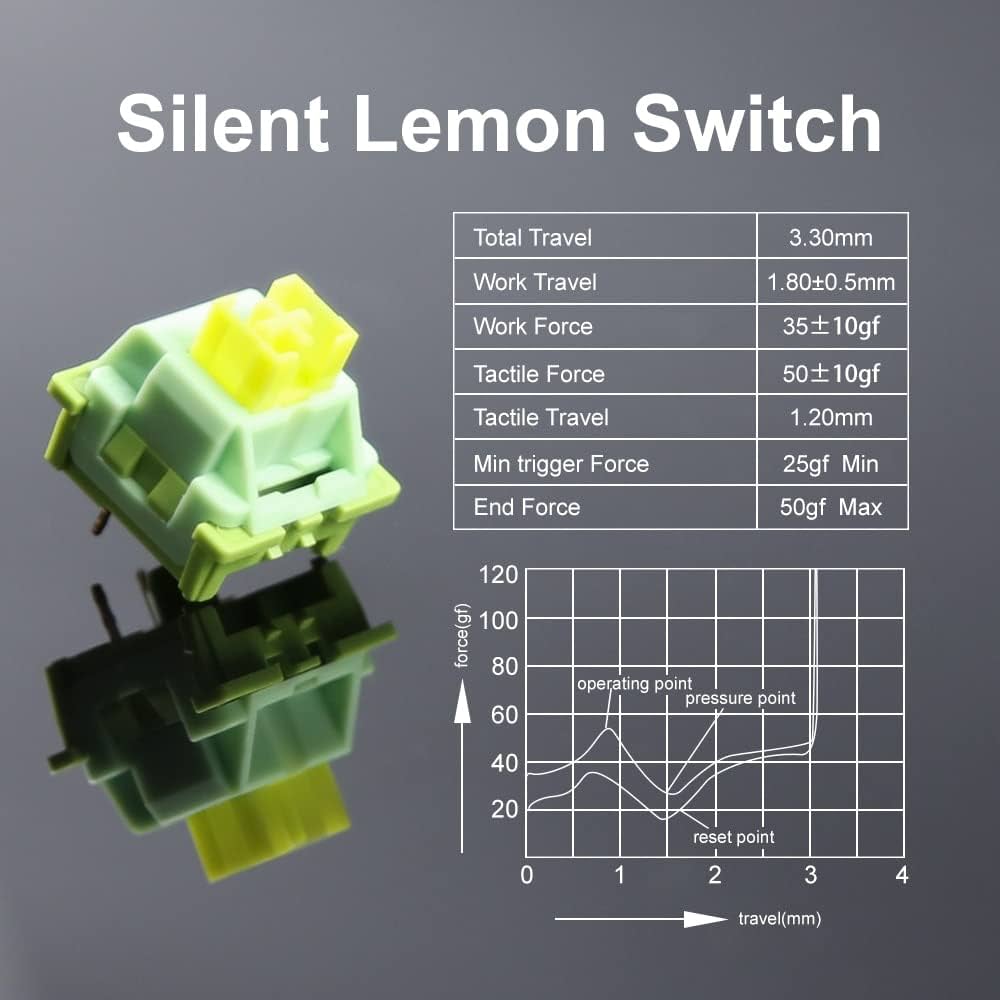
    I went with the Outemu Lemon silent tactile 3-pin switches (NOT the V2 which are 5-pin), and they work great. They have a good amount of tactility and are very quiet. The only noise I have now are the rattling stabilizers which I will get to later.

    Removing the old switches

    Removing the old switches was a massive PITA. The cheaply-made sockets are inconsistent and some switches are very tightly seated; some pins have also corroded over time making it impossible to pull the switch out from the top with just a switch puller.

    I found that the best way to remove all the switches was to unscrew the bottom cover and push the center stem out from the back while slowly prying the top/bottom of the switch up from the front using a small, flat screwdriver. This took me over an hour and a lot of elbow grease, and also damaged a dozen switches along the way (broken pins, damaged outer casing) – so be prepared to toss the old switches (which are crap anyway).

    Installing new switches, reassembly

    The switch installation process was straightforward. Since I had the keyboard apart, it was also good to ensure that every switch sat nicely on the board. The same problem with the socket exists during installation – some are tighter than the others, so pushing them while the case is apart ensures the board sits flat with the switches.

    Extra dampening – painter’s tape

    I also added two layers of painter’s tape (aka masking tape – I use a high quality one from 3M so it doesn’t leave sticky residue) over the bottom of the circuit board to add some extra dampening.

    Stabiliser noise

    After having extremely silent switches, the only noise you notice are rattling from the cheap stabilisers that can’t be replaced. There are only two stabilizers on this keyboard: spacebar and right shift key.

    It seems the rattle is primarily from the hinge on the keyboard plate. Adding some dielectric grease can help reduce the noise. I didn’t have any, but would try it if I did.

    Conclusion

    I know this is a cheap keyboard, but I didn’t want to add it to the landfill so being able to reuse it for the office would be a great. The new pack of 90 switches costs me less than SGD $30 on Aliexpress, and is cheaper than buying another keyboard.

    After typing (including this blog post) on the keyboard for a while, I must say I like the Outemu Lemon switches are much better than the original blue clicky ones which I felt were too noisy, wobbly and inconsistent.

  • Obins Anne Pro (v1) User Guide

    Obins Anne Pro (v1) User Guide

    I was gifted this keyboard and decided to write a proper English User Guide as a contribution back to the community for the blessing. I believe many people are still using this keyboard even though it’s rather old, and the only other English user guide that exists is poorly translated from Chinese.

    Tested with firmware 1.40.00.

    Bluetooth/setup mode

    Enter setup mode by pressing FN+B. Pressing ESC or FN+B again exits the mode.

    When in setup mode, the keys 1, 2, 3, 4, A, B, 0, and + are lit.

    Once in setup mode, press the following to configure specific settings:

    • “+” – Enable bluetooth broadcast
    • “-” – Disable bluetooth (radio off)
    • FN+1, 2, 3 or 4 – Save current connection to a profile (1 thru 4) – bluetooth must be connected to device before saving
      • Red = no device saved
      • Yellow = device saved
      • Green = current connected device
    • 1, 2, 3 or 4 – Quick switch to a saved profile
    • FN+0 – Switch between Bluetooth Low Energy (BLE) mode and normal mode
      • Green – BLE mode (discovered device name contains “L0”)
      • Yellow – Normal mode (discovered device name contains “L1”)
      • Takes about a second or two to switch after you press the key
    • A – Enable/disable backlight auto-sleep (new in 1.40.00)
      • Green = Auto-sleep on (backlight will switch off after 1 minute)
      • Red = Auto-sleep off (backlight will not switch off)

    Switching layouts

    The keyboard has four different layouts:

    • Windows
    • Windows with ALT/FN/Menu/? keys as arrows
    • Mac (Alt and Win swapped)
    • Not sure (undocumented)

    How to switch modes:

    • Press L CTRL + R CTRL
    • Release either one CTRL while still holding the other down
    • Tap the released CTRL key to cycle through the modes

    You will see the numbers 1, 2, 3, 4 light up in green indicating the current layout mode.

    FN mode lock

    To activate FN lock:

    • Press ALT+ALT
    • Press ALT+ALT again to revert to normal mode

    There are no visual indicators to tell if you are in FN lock.

    Backlight modes

    Various backlight options are controlled through four function toggles:

    • FN+R – Turn off/on backlight
    • FN+T – Rate/speed change (for animated modes)
    • FN+Y – Backlight brightness (10 levels)
    • FN+U – Cycle through different backlight modes

    Available modes:

    • Static red
    • Static yellow
    • Static green
    • Static cyan
    • Static blue
    • Static purple
    • Static pink
    • Static orange
    • Static white
    • Static blue/white/red (France flag)
    • Static green/white/red (Italy flag)
    • Static cyan with white middle row (row 3)
    • Animated pulsing colour cycle
    • Animated rainbow scrolling/marquee
    • Random colour on keypress (fades away)
    • Random colour on keypress (remains lit)
    • Animated light spread on keypress
    • Animated random colour on keys

    Win key disable

    To disable the Win key (or Command key in Mac mode):

    • FN+WIN – Disable the WIN key
    • FN+WIN again to enable

    There’s no visual indicator on whether the key is locked or not. In Mac mode, FN+ALT locks the command key.

    DFU mode

    DFU mode is required for upgrading firmware.

    To enter DFU mode:

    • Unplug the USB cable
    • Hold ESC while poking the reset button behind the keyboard
    • Connect the USB cable

    These instructions are also posted as a README in GitHub:
    https://github.com/detach8/obins-anne-pro-user-guide/tree/master

  • Are Network Load Balancers Faster? A story on Engineering decisions.

    Are Network Load Balancers Faster? A story on Engineering decisions.

    I was working on a project and an Engineer approached me after going through the AWS environment. He made a recommendation to switch from an Application Load Balancer (ALB) to a Network Load Balancer (NLB), and his reason was that the application may potentially receive high traffic and that the NLB has better performance.

    Well, he is not wrong because AWS’s documentation states“If extreme performance and static IP is needed… we recommend you use a Network Load Balancer.”

    However, the statement from AWS concerns only the performance capabilities of the load balancer — it doesn’t mean that your application as a whole would have better performance.

    Whatttttt??? I’m talking rubbish, right?

    I used to work with a telco to build and maintain HTTP Load Balancers back in 2009. We were load balancing at its peak around 20 Gbps of HTTP traffic to a web cache farm sitting in the core of the telco’s network. Web caches were really important for user experience because most of the web content that Singapore users consumed was overseas.

    Serving up 20 Gbps of web traffic was a huge feat during that time — most PC still had 100 Mbps LAN, and we didn’t even have fiber broadband in Singapore yet. We had around 40 web cache servers, each only capable of handling around 500–600 Mbps of load. The bottleneck on the cache server was disk I/O and CPU.

    The optimizations that HTTP LBs do became very important. Good HTTP LBs advertise all sorts of fancy features for a reason (because people need them), but the most important bit is that it takes work away from the backend servers — the LBs we used back then (Citrix NetScaler) will multiplex multiple HTTP requests across a single TCP connection. This made a HUGE difference to the web cache server performance. Without this feature, each web cache can barely handle 100–200Mbps of load because under millions of requests TCP connections are being set up and torn down. If you know how HTTP servers work, you will know that every TCP connection is a new thread which is an expensive operation.

    A few years later, I was once again dealing with LBs for a US tech startup. At the peak, they were getting millions of API requests and their servers were struggling. I replaced traditional NLBs with ALBs and it reduced the load of the backend servers by 20–30%.

    In most cases, backend servers are already busy doing what it needs to do — business logic, database access, etc. What you’d want is to have the LB offload any extra header processing, routing rules, redirection/filtering, SSL, etc. so your servers don’t have to. Another feature of an ALB is its ability to use more intelligent load distribution algorithms based on application-aware parameters such as HTTP headers, which can be very important with HTTP applications.

    The Engineer made an assumption that an NLB will yield better performance — but we didn’t have data, and didn’t have an actual performance issue.

    As Engineers, we need to know how to do work with meaningful impact and outcomes and avoid trying to prematurely optimize based on assumptions.

  • What are the kids thinking? A peek into the future of the Metaverse

    What are the kids thinking? A peek into the future of the Metaverse

    Earlier today my eldest son (7 years old) came up to me and asked me to help him buy Robux, the in-game credits for Roblox. He wasn’t asking me to pay for it — instead, he handed me $10 from his angbao savings and wanted to spend it on dressing up his Roblox avatar.

    Obviously I said: “No.”

    Later in the evening I was working on my old IBM laptop that is now around 16 years old. It runs Linux and I was using it to wipe some old hard drives I intended to dispose. While the slow wipe was running, I was bored and decided to play a retro game on my retro laptop: DOOM.

    In the game, this help screen appears when you hit F1:

    Screenshot of the Help screen in Doom (1993)

    What caught my attention was that you could buy Doom for $40 (USD) including Shipping & Handling. $40 was quite a bit of money back in those days, but it was not just a game – Doom was one heck of an engineering feat for the price.

    A little history — you can skip this part if you aren’t interested: Doom was developed back in 1993. When Doom was built, the game engine itself was entirely new and it was the first time the world has ever seen such real-time (pseudo-)3D graphics in a home computer. This was around the same time Intel launched the Pentium processor after its success with the 486. Let me repeat, in case it was not obvious: 66MHz was the fastest desktop CPU you could get at that time; your microwave oven probably has a faster CPU today. Games these days rely heavily on layers of technologies built over the years — hardware GPUs, 3D libraries/APIs (like DirectX/OpenGL), and game engines (like Unity). There were no such things back in 1993. Graphics in Doom is purely CPU-rendered.

    But if I went to my parents back in 1993 and asked for $40 to buy the game, my parents would have gone:

    “SIAO AH?”

    This was what got me thinking: what was my son’s motivation behind paying for fancy clothes on his virtual character?

    My generation today have accepted that it is normal to buy games. The transaction rewards the buyer with entertainment (playing the game), and the seller for their efforts (creating the game.)

    30 years ago, my parents would have been paying for something that their parents (i.e. my grandparents) would have thought were simply a waste of money. 30 years from now, our kids will be paying for something that we thought was nuts today.

    I was initially skeptical, but Mark Zukerberg may be up to something with this whole Metaverse thing. The technology is probably a bit too early for its time. Something must first exist to bridge the gap, and I think it might be in the form of an immersive, social-gaming app.

    Another thing: There’s some misconception that the Metaverse is/needs Virtual Reality (VR); VR is one of many technologies that will enable us to live in the Metaverse, but it’s not the only technology. It is likely true that huge advancements in Virtual Reality (VR) or Augmented Reality (AR) technologies will enable more immersive and engaging metaverse experiences. The VR headsets we have today are akin to the PCs in the 1990s running pixelated 3D games: It looks crappy and uncomfortable to wear, and is sort of at the edge of getting better with graphics looking quite decent, but in due course the hardware size, performance and quality will likely catch up.

    The fact though, is that some aspects of this Metaverse is already here. Think about where people are spending more time and money.

    What does the future look like then?

    Think about a world where the digital resources becomes even more convenient and easy to access; think about the walls of your homes simply made of large digital screens where you could do anything you wanted – meet a friend, go to work, pull up a photo; think about getting into a train but being in a virtual world where you could still talk to your kids at home… or on Mars?

  • Gravitational Teleport as a Bastion Host

    Gravitational Teleport as a Bastion Host

    Gravitiational Teleport is a pretty neat and lightweight open-source software that works great as a bastion host. However, some parts the documentation can be a bit vague for a first-time user so this blog entry serves as a reference material for myself, and hopefully it is also helpful to you.

    Introduction

    Teleport is a great way to control access into a network of restricted systems. It can be used as a single-point-of-entry, or commonly known as a “bastion host”.

    Components

    The same Teleport software is installed on every system, i.e. the server and the client installs the same package/binary. The software package contains the following components:

    ServicePorts
    Auth

    Authentication service to authenticate Clients and Nodes, and is also the Certificate Authority (CA) for the Teleport Cluster
    3025 (Restricted access from Nodes only)
    Proxy

    Web UI for public users (Clients). Tunnels SSH from Clients to Nodes. Also allows Nodes to create a reverse SSH tunnel through it for Client connections.
    443 (HTTPS, can be public to Clients, should also be reachable by Nodes)

    3023 (SSH Proxy, can be public to Clients)

    3024 (SSH Reverse Proxy, restricted access from Nodes only)
    Node

    Provides SSH access to the system.
    3022 (SSH, restricted access from Proxy only)

    A Teleport “Server” only requires two components – Proxy and Auth, although a Node usually runs on the Server as well.

    The Nodes (“Protected Resource”) would only need to run the Node component.

    Server setup

    In the example below, I am using an Amazon Linux 2 instance. You can refer to the installation docs for other distros.

    Pre-requisites:

    1. Set up an instance with a public IP address
    2. Set up a DNS hostname that resolves to the public IP address correctly (this is required for LetsEncrypt)
    3. Ensure the following TCP ports are open/allowed
      1. Inbound, TCP 443, from public (required for LetsEncrypt)
      2. Inbound, TCP 3023, from Clients
      3. Inbound, TCP 3024, from Nodes
      4. Inbound, TCP 3025, from Nodes (you can omit if you use reverse tunnel for Nodes behind firewall)
      5. Outbound, TCP 3022, to Nodes

    Install Teleport:

    sudo yum-config-manager --add-repo https://rpm.releases.teleport.dev/teleport.repo
    sudo yum install teleport

    Configure Teleport; replace your email and DNS hostname:

    sudo teleport configure \
      --acme --acme-email=<your.email@fqdn.here> \
      --cluster-name=<your.dns.hostname.here> \
      -o file

    At this point, you should realise that the configuration file is /etc/teleport.yaml. This file controls how and what component Teleport runs.

    Start Teleport in foreground to test/debug first:

    sudo teleport start

    If all goes well, you should be able to reach the web interface at HTTPS port 443. Hit CTRL+C to stop, then start it as a service:

    sudo systemctl start teleport
    sudo systemctl enable teleport

    User management

    When Teleport first starts, there are no user accounts provisioned. Add the first user:

    sudo tctl users add --roles=access,editor --logins=root <username>

    (This is your first interaction with the tctl command. The tctl command is the CLI admin tool for the Auth service. Type tctl to see other commands available.)

    In the example above, the user is given the access and editor roles to Teleport, and can login as the Linux root user to Nodes.

    To see what roles are available:

    sudo tctl get roles

    Once the user is added, a sign up URL is provided. Send it to the user to set up his/her Teleport account, including registering an OTP. OTP is mandatory.

    Note that Teleport does not create the logins on the Nodes. If the login does not exist, an attempt by the user to access the Node will simply fail.

    Node setup

    In the example below, I am using an Ubuntu instance. You can refer to the installation docs for other distros.

    Pre-requisites:

    • Ensure the following TCP ports are open/allowed
      • Inbound, TCP 3022, from Proxy
      • Outbound, TCP 443 and 3024, to Proxy

    Install Teleport:

    curl https://deb.releases.teleport.dev/teleport-pubkey.asc | sudo apt-key add -
    sudo add-apt-repository 'deb https://deb.releases.teleport.dev/ stable main'
    sudo apt-get update && apt-get install teleport

    From the bastion host (Server), generate a temporary token used to join a node:

    sudo tctl tokens add --type=node --ttl=5m
    sudo tctl tokens ls # View tokens and expiry

    The --ttl=5m option sets a short 5 minute expiry for the token. Tokens are one-time-use only, so after a server has used the token, it should either expire or we should remove it.

    Copy the output from the tctl tokens add command and run it on the Node to join:

    sudo teleport start \
      --roles=node \
      --token=xxxx \
      --ca-pin=sha256:xxxx \
      --auth-server=your.dns.hostname.here:443

    Note: If you change auth-server from the default port 3025 to port 443, the Node will join via reverse tunnel.

    The above command starts Teleport in the foreground for debug/testing. If Teleport registers successfully, you should see it appear on the Web UI. Hit CTRL+C to shut down Teleport on the Node.

    Create a file /etc/teleport.yaml on the node; replace nodename and ca_pin:

    teleport:
      nodename: <your node name here; does not need to be a fqdn>
      ca_pin: "sha256:xxxx"
      auth_servers:
        - your.dns.hostname.here
    
    ssh_service:
      enabled: true
    auth_service:
      enabled: false
    proxy_service:
      enabled: false

    Fix permissions to ensure that only root can access /etc/teleport.yaml:

    sudo chown root:root /etc/teleport.yaml
    sudo chmod 0600 /etc/teleport.yaml

    Now, start the Teleport service and test if you are able to reach via Server’s Web UI:

    sudo systemctl start teleport
    sudo systemctl enable teleport

    Access control

    Control of access privileges is dependent upon the individual Node’s provision of the login user.

    For example, if I had the following users on my Nodes:

    Linux LoginNode ANode BNode C
    engineerCan sudoCan sudoCan sudo
    developerCan only view logsCan sudo(No account)

    … and I provision the following users, the resultant access would be:

    Teleport UserCan login asResult of access
    user1engineerCan login to all Nodes and run sudo
    user2developerCan view logs on Node A
    Can sudo on Node B
    Can’t login to Node C

    Note that the provisioned user on the Node does not need to have a password or SSH key, but must have a valid shell.

  • Why Unit of Work is an anti-pattern but not Repository

    Why Unit of Work is an anti-pattern but not Repository

    Is Repository and Unit of Work (UoW) an anti-pattern? In the .NET/C# world, it is often said that Repository/UoW is an anti-pattern and one should probably use Entity Framework Core directly.

    But if it is an anti-pattern, why are people still using it? Even Mosh Hamedani – a respected YouTube coding trainer whom I follow – wrote about common mistakes when applying this pattern. Surely it must be popular.

    Purpose of the Repository/UoW Pattern

    Let’s talk about why this design pattern exists. It is actually a type of Adapter pattern and the primary use case is for separation of concerns between domain (or “business logic”) and infrastructure (or “data access”).

    The other motivation for using this pattern is to allow mocking repositories for unit testing.

    Must Repository go together with Unit of Work?

    It is also very common to see the Repository pattern used together with the Unit of Work (UoW) pattern. The UoW pattern is added to manage transactions – a feature of relational databases to perform ACID operations.

    However, there is increasing tolerance for eventual consistency and less atomicity; fully ACID operations are starting to matter less these days as software adopts the microservice architecture.

    So unless you are a bank, or dealing with critical financial data, maybe building your software with transactions management – a feature that is specific to RDBMSes – might not be the kind of dependency you want.

    Why is UoW an anti-pattern sometimes

    I’ll start by saying that everything depends on your use case, but for me – I tend to feel that Unit of Work (but not repository) is an anti-pattern.

    Let me explain why.

    You see, the repository interface can be described in its simplest form as an interface for read/write operations.

    // What a typical repository looks like
    public interface IMyRepository
    {
      MyObject GetById(int id); // Read
      IEnumerable<MyObject> SearchByName(string name); // Read
      void Update(MyObject object); // Write
      void DeleteById(int id); // Write
    }

    I’ll use an analogy here: In good old C, the standard input/output header defines basic read/write operations. The interface <stdio.h> is an abstraction of the underlying data access implementation and is a close example of the repository pattern – the interface doesn’t care if you are writing to the console, to a filesystem, or to a serial port – just like a repository interface shouldn’t care if it was an RDBMS, or a CSV file, or even a remote API call.

    Does <stdio.h> expose specific features of a particular filesystem or a serial port? No. So why should a specific feature of an RDBMS (transaction management) be depended upon outside of a repository interface?

    userRepository.Update(user);
    unitOfWork.Save(); // If this was not done, the record will not be updated!

    Using the C example from earlier: Imagine having to always call fsync() (from <unistd.h>) after calling fwrite() in order to commit changes – does it make sense? Sure – you may call fsync() if you wanted to force your changes to disk immediately, but you do not and should not have to explicitly call it.

    (In .NET there is Transaction Scope, but that is a topic for another day.)

    How much to depend on the RDBMS?

    RDBMSes are great tools with important features, but as an application architect, I often ask myself if it really matters to the application I am building.

    Sure, almost 99% of the time the RDBMS is unlikely to be switched for anything else. Heck, in some applications it may even be the same version of MySQL for the rest of the application’s life – that’s probably because many applications were designed with a database-first approach (and I have another blog article coming up about why a database-first approach should probably be avoided.)

    So you may think, YAGNI – let’s not over-design the application. Maybe in such a case, you may be better off without the Repository/UoW pattern entirely, but… this is 2021, and you are unit testing your code, rightttt?

    Unit tests and mocks

    If you have ever attempted to mock an ORM framework, you’ll know it is pretty impossible. Sure, EF Core has an In-Memory Provider that can be used for testing, but that has a lot of caveats.

    As a result, it would be easier to apply the repository pattern instead of attempting to mock the ORM framework.

    Mocking the test, or testing the mock?

    Ever had unit tests pass but integration tests fail because of database constraints? Ever tried testing code that relied on a transaction rollback? Mocking the behavior of an RDBMS is extremely difficult, and spending half our lives trying to mock how an RDBMS works shouldn’t be the case because we do not want to end up testing our mocks instead.

    // Typical use of UoW
    try
    {
      userRepository.Update(user);
      unitOfWork.Save(); // This commits the transaction
    }
    catch (Exception ex)
    {
      unitOfWork.Rollback();
    }

    Example: How would you mock and test the rollback?

    Instead, we should implement repositories as if we were writing data to regular storage – think of it as writing to a CSV file, memory, Redis cache, or something else.

    Do CSV files have transactions? No.

    Then, maybe we should not use Unit of Work:

    try
    {
      userRepository.Update(user);
    }
    catch (Exception ex)
    {
      // Log an error and fix it manually, retry the operation, place
      // the update in a queue to be processed later if you really HAVE 
      // to make this update, otherwise just throw the exception!
    }

    The generics phenomenon

    The typical Repository/UoW pattern is to make each repository represent a single domain entity, e.g.

    public interface IUserRepository
    {
      public void GetById(int id);
      public void Create(User user);
      public void Update(User user);
      public void Delete(int id);
    }
    
    public interface IGroupRepository
    {
      public void GetById(int id);
      public void Create(Group group);
      public void Update(Group group);
      public void Delete(int id);
    } 

    And as a result, it is common to have these further reduced to a generic interface to reduce the repetition on CRUD methods, e.g.

    public interface IRepository<TEntity>
    {
      public void GetById(int id);
      public void Create(TEntity entity);
      public void Update(TEntity entity);
      public void Delete(int id);
    }
    
    public interface IUserRepository : IRepository<User> { ... }
    public interface IGroupRepository : IRepository<Group> { ... }

    However, quite a large number of applications I have written do not use the full CRUD operations on every single repository. Some tables are read-only, some never require an update, some never get deleted.

    The N-N relationship

    Next, how do I add a user to a group, or assign a group to a user?

    Create yet another repository for the intermediary N-N relationship table and insert a record!

    public interface IUserGroupRepository : IRepository<UserGroup> { ... }
    
    // Usage
    var userGroup = new UserGroup(userId, groupId);
    userGroupRepository.Create(userGroup);
    unitOfWork.Save(); // Always remember to save!

    This is why implementations of the Repository/UoW often end up with a crazy list of interfaces and classes, and it’s probably not easy for a developer to figure out which repository to use. Is it called UserGroup or GroupUser? @#$%^&

    It is also extremely counter-intuitive to be actually creating a new object. In a regular object-oriented code, it would probably be written like this:

    group.AddUser(user);

    Why aren’t repositories written more expressively?

    Unlike <stdio.h> in C that I used as an analogy earlier, repository interfaces are not doing byte-level I/O operations – it handles more complex data types, so methods should therefore be written more expressively.

    For example, why not write the User-Group relationship methods in such a manner?

    public interface IUserRepository 
    {
      public void AddGroup(int userId, int groupId); // Inserts into UserGroup
      ...
    }
    
    public interface IGroupRepository
    {
      public void AddUser(int groupId, int userId); // Inserts into UserGroup
      ...
    }

    Even better – if your application will never ever see the need to store Users and Groups in different data stores, why not simply combine them into one repository interface?

    public interface IAccountServiceRepository
    {
      public void CreateUser(User user);
      public void CreateGroup(Group group);
      public void CreateUserWithNewGroup(User user, Group group); // Can use a transaction
      public void AddUserToGroup(int userId, int groupId); // Inserts into UserGroup
      ...
    }

    (Imagine you were writing to the UNIX /etc/passwd and /etc/group – how would you implement it?)

    One may argue that I’ve come full circle and am replicating a UoW but at the same time also violating the single-responsibility principle. Then again, what is the “single responsibility” of a repository? Often the term “single responsibility” is being taken out of context from what the originator (Robert C. Martin) had expressed it to be: “A class should have only one reason to change”. What external or structural influences may cause the interface above to change?

    Lastly, if CreateUserWithNewGroup() required a transaction for an atomic operation, shouldn’t the transaction be managed at the repository rather than by the domain? Should the onus of transaction management be placed on the domain layer or the repository layer? Is handling transactions in the domain logic also violating the single-responsibility principle?

    Conclusion

    Once again, if your software or company really, really, really depended its life on having consistent data in an RDBMS, by all means, continue to use the Repository/UoW pattern (or simply use the ORM directly since it is a hard dependency.)

    But for a large majority of cases, YAGNI. A single repository interface alone is probably good enough.

    This blog article was more of me thinking out aloud than trying to encourage or influence a change in how people implement repository/UoW, and comments are most certainly welcome.