Although Telnet is barely used anymore as a remote access protocol/tool, it is still a very popular debugging tool for tech professionals.
Unfortunately the quick fix here is to use netcat (nc).
alias telnet nc
Although Telnet is barely used anymore as a remote access protocol/tool, it is still a very popular debugging tool for tech professionals.
Unfortunately the quick fix here is to use netcat (nc).
alias telnet nc
Looks like a new Adobe Flash (a.k.a. Shockwave Flash) update caused widespread panic with users of the web-based flash vSphere Client 6.x leaving them with a “Shockwave Flash has Crashed” message and no vSphere Client. The immediate fix is to downgrade Adobe Flash.
VMware has released an official KB 2151945 but it only provides instructions for Windows users.
cd ~/Library/Application\ Support/Google/Chrome/PepperFlash/
rm -rf 27.0.0.170
You should now be able to get back to work in VMware vSphere Client. Drop me a note if the instructions do not work for you, I’ll be glad to update the content.

Most know that having different subnets for management traffic, vMotion, storage, etc. is a best practice but some may not understand why.
Let’s take for example you have a laptop and is connected to both wifi and LAN at home/office (on the same subnet). Which connection is being used when you browse the Internet or even print to a local network printer?
The answer is the first connection you are hooked up to, or the more technically correct answer is the route that is of a higher order of preference. When two NICs are connected on the same subnet, your local routing table will have two entries to the directly connected subnet, e.g.
192.168.1.0/24 via en1 metric 100
192.168.1.0/24 via en0 metric 100
When a packet is sent (e.g. to your gateway at 192.168.1.1), the operating system will look up the route table and pick the first match, and in this instance it would be en1. Of course if the two routes have different metrics, then the metric of a smaller number gets the preference.
But if you have both NICs connected to different subnets, e.g.
192.168.1.0/24 via en1 metric 100
172.16.1.0/24 via en0 metric 100
Then it becomes clear which path to take when you try to get to your printer at 172.16.1.15 or your NAS at 192.168.1.100.
The same thing happens when you have two (or more) vmkernel NICs on the same subnet. Separating the subnets will ensure that the desired traffic takes the correct path out.
Some may wonder why can’t interface binding be used, similar to running ping -I <intf>? The answer is yes! Interface binding is used for Multi-NIC vMotion (5.1 and newer) and for the Software iSCSI initiator where iSCSI multi-pathing requires two or more different vmknics within the same subnet. But this works only with vMotion, the Software iSCSI initiator, or other specific ESXi services designed to have NIC binding.
To allow NIC binding to work, the general requirement is that only one active physical NIC can be present in the NIC teaming configuration, e.g.
// vSwitch setup
vSwitch0 = eth0, eth1
vSwitch1 = eth2, eth3
vSwitch2 = eth4, eth5

// No port binding
vmk0 management 192.168.1.11/24 via vSwitch0 (active: eth0, eth1)
vmk1 iscsi-hb 172.16.1.11/24 via vSwitch1 (active: eth2, eth3)

// Port binding services
vmk2 iscsi-1 172.16.1.12/24 via vSwitch1 (active: eth2, unused: eth3)
vmk3 iscsi-2 172.16.1.13/24 via vSwitch1 (active: eth3, unused: eth2)
vmk4 vmotion-1 172.16.2.11/24 via vSwitch2 (active: eth4, standby: eth5)
vmk5 vmotion-2 172.16.2.12/24 via vSwitch2 (active: eth5, standby: eth4)
iSCSI heartbeat which uses regular ICMP ping does not bind to a specific interface prior to vSphere 5.1. Back in the good old days, it was a best practice to create 3 vmknics and leave the vmknic with the lowest index number for iSCSI heartbeat to give it a routing priority. In vSphere 5.1 and later VMware addressed this and made iSCSI heartbeat bind to an interface but there have been reports of it not working as intended.
VMware introduced independent routing tables (know as TCP/IP stacks) in vSphere 5.5 but it was cumbersome to configure via CLI. In vSphere 6.0 three different TCP/IP stacks are available by default so that Management, vMotion and Provisioning (cloning, snapshots, etc.) traffic can be configured to route differently. For the Cisco guys this is easily explained as VRF. This introduction allows vMotion and Provisioning traffic to be routed. Although not usually needed, vMotion routing will be required if you want Long Distance vMotion to get across two different (routed) subnets.

This is in response to Ben’s note on Faecbook.
Businesses have limited budget for technology as it is a usually a cost center (regardless if it is classified as CapEx or OpEx) unless the business is like Uber where technology drives the business profits. The quality of a technology is often intangible and difficult to measure, and so the pressure is on the price. This is a sad fact.
It is a battle day-in and day-out on my job to either convince customers (very difficult) or to beat cheaper vendors by price (easy) simply because, like it or not, I am running a business and not a charity and I need to pay salaries. As an unfortunate result of price competition, I may not be able to deliver the quality of work that I desire. I cannot afford to spend all my time trying to deal with customers who do not appreciate the value of good technology and that is also the reason why I tend to be selective with my customers.
What needs to be fixed is the notion that technology is cheap and consulting is free. This bullsh*t idea started with the Singapore Government and has trickled down to several MNCs and Government-linked organisations. I’ve stopped attending long meetings and helping write tender specs only for jobs to be given to the lowest bidder with an outsourced team. Not forgetting it usually takes forever to get a bid out, then when the bid is awarded, they are behind time and want it done now.
Even if a tender comes in with a spec, it is often terribly written and participating in a bid is a hell lot of paperwork with not much money to be made, and on top of that — many unknowns and liquidated damages to bear.
Tenders only make sense for off-the-shelf and boxed products and should go away for bespoke products and consulting work. Nobody walks into LV or Prada to pick the lowest bidder.
Try going to a pharmacy and say: “I want a drug that reduces my fever.” There are easily 3-4 different types of medicine with different applications, strengths, safety and side effects. Most of us only know Panadol, but is that really what we need?
You see, even with well written specs (not usually the case), no two bids will ever be exactly the same (except maybe for boxed software licenses, like Microsoft Office.) How can price be a major selection criteria? Such a notion is simply flawed. If you have ever done a home renovation and gotten quotes from contractors you will know how incredibly difficult it is to have apples-to-apples comparison because every contractor will have their own ideas, style, materials and workmanship. There’s no telling until the actual work is being done.
IT projects are many times more complicated, and more often than not there will be changes to specifications as the project progresses (which brings me to a different discussion about not billing by project and scope but instead by time.)
I can say with confidence and years of experience that technical specifications do not and can not normally prescribe software quality.
Ask a lawyer: “I want to sue this guy; tell me how much it costs.” You will almost always get a range, and it can be a huge range.
There’s a reason why lawyers charge by time and do not limit themselves to a scope. Software developers and technology consultants are no different: We take into consideration a situation or requirement and analyse them, then we act upon them and then also react on the results. The latter part is often missed.
Good advisory can save your ass and a whole lot of time and money, but it is very common that businesses expect free consultancy prior to work being done. Working on a software project is not just software alone; there are many moving pieces including the choice of technology (frameworks, databases, etc.), infrastructure design and operational expertise.
Expecting free consulting is no different than asking a building architect to work for free, and then paying only for the building construction costs. And no, we can not and should not “build in” the costs of consulting into development. They are two different things.
Let me make this clear that the ones who suffer are going to be the employees of businesses, not the business itself or the bosses. Businesses can and will always find ways to create profits, and if the profits can’t be had from sales, it will come from expenses (i.e. benefits) and salaries. We graduate some 4-5 thousand technology students from Polytechnics and Universities each year. The good firms can not hire everyone. It is not the fault of these young graduates that their skills stagnate over the years — they simply have been put in an environment that does not cultivate their growth.
As a technologist myself, I understand how good work gives growth and satisfaction to passionate people, and this is also something difficult to measure but will significantly improve corporate culture.
With regards to the Productivity and Innovation Credit (PIC): PIC has made a lot of people (aheem, fly-by-night vendors) rich, but it has also made it difficult for people like us who are trying to do real business and deliver good services because we do not actively sell PIC. In our experience, the real customers will never ask: “how much can we claim from PIC?” PIC is a bonus to them — their priority is to get stuff done.
I’ve seen countless people burnt by PIC and what’s worse is that it gives people an impression that technology acquisition is cheap. We can not use cheap technology (as is the case of a sushi joint with a sub-standard iPad software) to replace a trained employee (waiter). This causes job and salary issues because employees are now measured against “cheap” technology.
I met this old man at the ABC food center: He was with his classmates and I got to know him from a car club. I have to make a point here that these old folks aren’t your normal uncles or aunties; their classmates were Goh Chok Tong and Tan Cheng Bok, so they are pretty well off.
One of his classmates married a wife — I can not remember, but is either Thai or Viet — and he has migrated there to live with her family and has a farm and rice field. He says he hires the locals in the village to work in his farm and he gives away the crops because people are poor. I asked why he did not use technology to help with his farm (agriculture is a very technologically advanced business), and he said something that really struck me — why replace the jobs when there are many poor people there who need the jobs.
With that, I leave you something to think about.
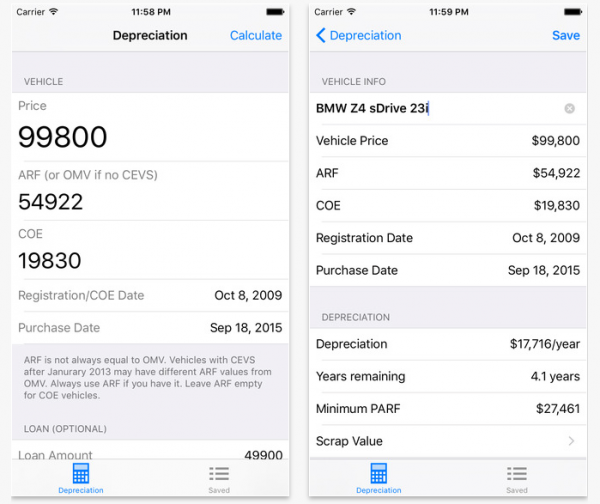
I just wanted to put this out there. This little app I built was finally approved by the Apple for the App Store last night. I am making it FREE until the end of this year. It will be on sale for S$1.28 starting 2016.
https://itunes.apple…ro/id1035354237
There are two other similar apps on the App Store going for S$1.28 but neither have as complete a feature set as this, which is a reason why I found it compelling to build the app myself. It’s difficult to be calculating depreciation especially when walking around at a dealer, so the ability to save the calculation and back-reference is very important.
You can also enter your current vehicle into it and see your scrap and loan redemption values over time. This is very valuable if you want to know how much you still owe the bank during a trade-in.
I will probably release a “Lite” version with advertising and less features in 2016, so do grab this Pro version while you can because I will likely drop the loan redemption and save functionalities in the Lite version.
All suggestions/feedbacks are welcome.
P.S. Sorry, no Android version yet.
But letting go is not.
I spent several weekends in August tidying up old PCs and other computer hardware, hopeful that it would benefit some people.
One laptop went to a needy family. That was easy, because it’s a small laptop (a Netbook, to be exact.)
There were two other needy families who wanted computers, but never came. The pile of old computers remained uncollected in my parent’s office for over two months.
The dateline I gave was 31st October, so mid November we loaded all of them to the back of the car and drove them to the Salvation Army only to be rejected because “Windows XP is too old.”
These are perfectly working computers that I cleaned up, re-installed the OS, packed neatly and labelled the hardware specifications.
I felt a little discouraged, so I tried advertising them again on Facebook. This time, 3 more pieces of hardware reserved, pending collection.
I still have 2 computers and a bunch of old monitors, keyboards and network switches.
Drove to Funan Center and dropped monitors, keyboards and network equipment off at the information counter where they provide e-waste recycling.
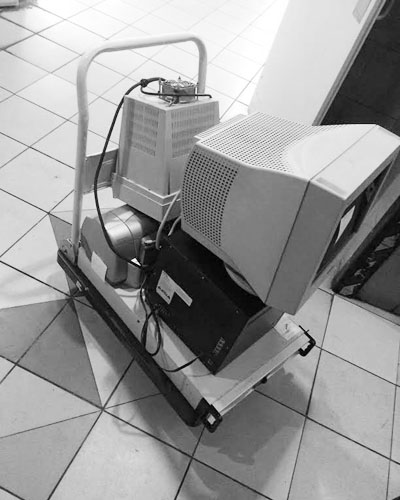
Above: Old hardware at the lift lobby at Funan Center
I drove the last 2 computers to office where I intend to keep them for a bit more, or perhaps place notices on the lift doors to see if anybody wants them.
Just as I was unloading the computers from my car, a foreign worker who cleans the trash at the office building saw me placing the computers on a trolley. His eyes lit up as he approched me.
“This. Throw?” he asked, pointing at the computers.
“Ya. If you want, take them — all working,” I said.
“Working?”
“Ya.”
He pushed the trolley to the back of the refuse area where I saw some old furnitures and a HUGE server (something like a massive IBM blade chassis). He unloaded my computers, then returned my trolley.
I hope he’ll find good use for them.
I’m still puzzled why Salvation Army would reject these perfectly working computers. I know they try to sell them for money as it is logistically not worthwhile to transport them to third world countries, but they could have given them out for free at the thrift store too. Maybe they have insufficient manpower; I feel for them because I get upset every time I see the pile of junk people leave behind at the outdoor donation bins.
Salvation Army is not a recycling facility.
Nevertheless, a good lesson learnt here is that things are easy to buy, and never easy to let go. I’m trying to be a minimalist because I value my personal space more than anything else. Space is expensive and precious, especially on this tiny island.
Think before you buy.
P.S. People asked why I never offered to deliver the computers to the needy families since I drive. I don’t believe in giving to laziness. I worked my ass as a student carrying computers and computer parts on the bus to and fro my home and Sim Lim Square as a kid, and I don’t believe they can’t drop by and pick up a CPU on a bus. I will give for free, but at the very least they will have to come get it.