While Apple has successfully proven to the world that a well designed Graphical User Interface (GUI) can indeed provide better user experience, the beauty of a good Command Line Interface (CLI) shouldn’t be forgotten either.
A GUI works well in consumer environments (e.g. SOHO routers), but enterprises and service providers work a little differently.
I work in a service provider environment and have seen quite a fair bit of “high end” technology products. (These are usually appliance or black box hardware, like firewalls, routers, load balancers, DPIs, etc.) My observation is that while a lot of them have a great solution to an engineering problem, they actually create a management problem. Why? Because of the lack of a proper CLI or a proper management tool.
There’s only so much a GUI can do to manage something as complicated as, say, a firewall. Check out the screenshots below taken from Mac OS X and Windows XP. They’re surprisingly complicated and not exactly useful. FYI, clicking on the [+] button on the Mac brings you to a file browser; I was expecting a form with IP address, port numbers and protocols.
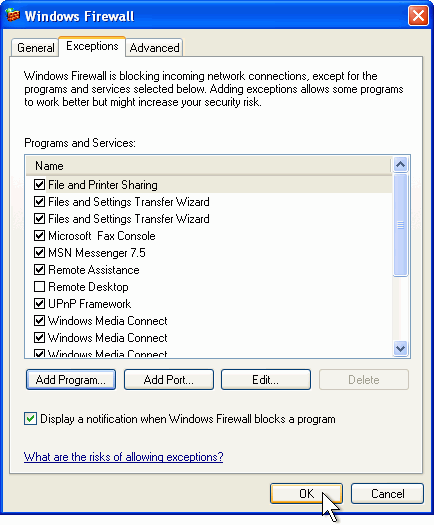
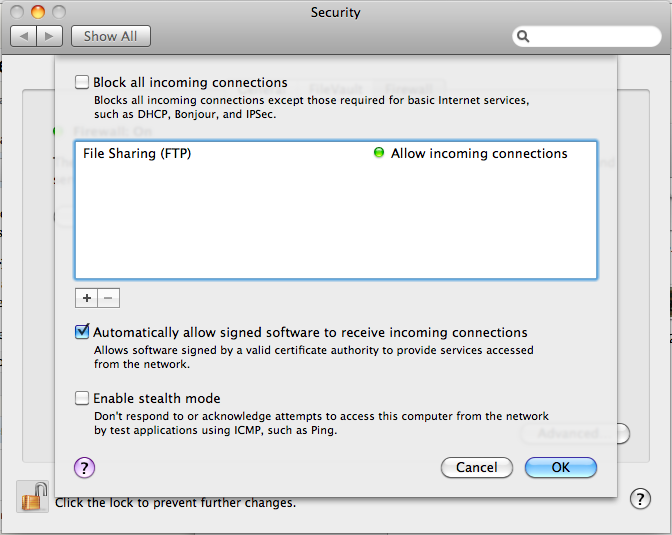
So, how do I add a rule to allow my custom app running on UDP port 15,233? How do I tell the firewall to stop processing further rules if I see a certain TOS marked packet? These aren’t use cases for consumer firewalls, but in enterprises, rules like these are very common.
Firewalls are actually simple examples of GUI gone wrong. However, there are way more complicated devices than firewalls around, such as load balancers, DPIs and all sorts of routing gear. The problem gets multiplied many folds when there are tens, hundreds or even thousands of these configurations to manage on multiple machines.
While a fancy GUI gets you through a sales pitch with the higher management folks, it’s really a PITA for the guys (like me) running the show. There’s a certain beauty in CLIs that GUIs cannot emulate. One if them is duplication. It is extremely difficult to duplicate mouse clicks and menu navigation, not to mention getting around errors. Imagine you have 1,000 Windows XP machines. You need to add a new firewall rule to allow your users to access a new mail server. Without Active Directory, you’d have one hell of a time… clicking.
The other pain of working in enterprise datacenters is the lack of remote access (thanks to NAT and VPN crap) or an actual monitor console. Many engineers run around with a laptop and a RS232 serial cable. That’s all that’s needed to manage a device on the run.
So if you’re going to build something for the enterprise, particularly appliances/black box devices, please focus some effort on building a proper CLI or centralized management. Learn from the experts – there’s a reason why guys like Cisco, Juniper and Extreme are industry leaders.