Author: Justin Lee

  • How AI will transform Learning and Hiring in Software Development

    How AI will transform Learning and Hiring in Software Development

    The era of Google

    I remember my time as a student back in 1999: a new search engine, Google, was starting to edge out AltaVista and Yahoo — both of which dominated the Internet search landscape throughout the 90s. It was an exciting time for Computer Engineering, as open-source software like Linux was gaining traction in Enterprises. Microsoft and the Java ecosystem were also equipping us with powerful IDEs like Visual Studio, JBuilder, and IntelliJ with features like code completion. Yet, despite these advancements, we still relied heavily on books as primary sources of information. Exams were still handwritten, even for coding: we memorised library functions and syntax, despite having access to the Internet and some fairly advanced tools.

    Our schools insisted on handwritten code and taught us programming using Notepad instead of IDEs. At the time, student laptops were underpowered, and IDEs were huge memory and CPU hogs, running painfully slow. Despite the inconvenience, students like me made every endeavour to set them up, knowing the efficiencies they offered.

    Today, this all sounds ridiculous. With modern IDEs, who would memorise hundreds of function calls or API structures? I actively work across multiple programming languages and frameworks and use countless DevOps tools and certainly can not memorise everything; perhaps it’s age, but it’s nearly impossible to keep all these details in my head.

    The rise of AI

    Twenty-five years on, the world is vastly different, but education systems still lag in adapting to technological shifts. Educators remain cautious about how AI impacts academic integrity and the assessment of written or coding assignments. While AI use isn’t necessarily discouraged, it’s also not fully encouraged; students are however already using AI, much as we once turned to Google and IDEs in place of traditional textbooks.

    For Software Development, AI coding assistants are here to stay, yet they’re unlikely to replace Software Developers soon — especially those who leverage AI-enabled tools. There are stories of startups built by non-technical founders using AI-generated code, but the actual efficacy of purely AI-driven development remains unproven. 

    So, what should we teach students, and how should we evaluate professionals?

    Educational institutions and hiring managers must rethink how they assess skills in this new landscape.

    Developing Strong Fundamentals

    AI models today, especially large language models (LLMs), are not infallible. They can produce erroneous or nonsensical responses. Strong foundational knowledge enables students and professionals to evaluate AI outputs critically and refine prompts to achieve the desired results. From my experience with students using AI-generated code, those lacking fundamentals struggle to interpret the code correctly and often can’t integrate it with existing codebases. For instance, AI models can generate verbose scaffolding or unnecessary details that may disrupt the intended functionality. Without solid fundamentals, these additional complexities create confusion instead of clarity.

    Cultivating Critical Thinking

    Critical thinking is crucial for discerning when and how to use AI solutions effectively. Humans bring valuable contextual knowledge to problem-solving — something not easily available to AI. Tackling complex real-world problems often involves navigating nuances such as geographical, cultural, and political factors. As a simple example, a form with “first and last name” fields may not be culturally appropriate in some countries, especially in parts of Asia where such naming conventions are uncommon. While an AI model might “know” this in theory, it often requires a user’s insight and critical thinking to specify it in an AI prompt when generating a form.

    Mastering Communication

    Although AI can generate well-structured text, effective communication remains a uniquely human skill. Communication goes beyond words to include emotional intelligence, empathy, and cultural sensitivity. AI may one day grow up with us and learn every little bit of detail of our lives (it is a scary thought, but absolutely possible future) but it won’t easily replicate the nuances of face-to-face interactions, emotional cues, or the subtleties involved in team dynamics. Communication skills, therefore, remain vital for collaborating with others and expressing complex ideas in ways that are both clear and motivating.

    Conclusion

    As we move forward, Software Developers will still need to synthesize large amounts of information before even engaging AI. We may no longer need to memorise every technical detail or write every bit of code, but we’ll still need a robust foundation to understand, prompt, and critically evaluate AI-generated responses. AI is reshaping learning and hiring, but the fundamentals of understanding, thinking critically, and communicating effectively will remain core competencies in software development for the foreseeable future.

    This article was also posted on Medium.com:
    https://medium.com/@detach8/how-ai-will-transform-learning-and-hiring-in-software-development-642e3d678cc5

  • Modding the Armaggeddon MKA-2C keyboard

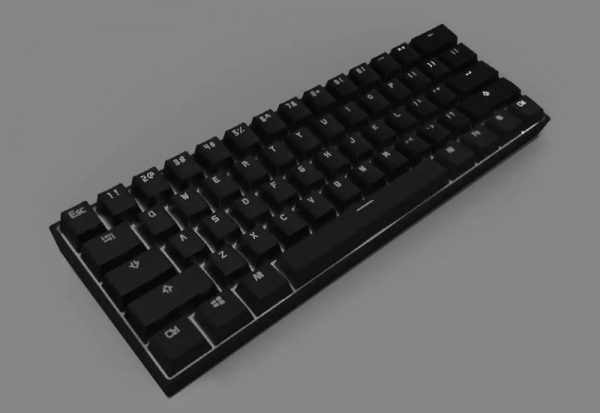
    I had this keyboard sitting around the house for a while and decided to modify it – specifically, change the switches to a silent one so I can use it in an office environment.

    tl;dr It’s not as “hot-swappable” as it was advertised to be.

    Switch compatibility

    It seems to be only compatible with Outemu 3-pin switches. The electrical pins are narrower than usual, which fits the board.

    I tried using an Akko 5-pin switch by cutting off the the two extra plastic pins on the sides, but it still didn’t fit well. The electrical pins and the center supporting stem are a little bit too thick. Even after shaving down the electrical pins, the switch does not sit flush with the top plate, so I’d advise to not use any 5-pin switches as it seems the dimensions are slightly off. Some other 3-pin switches may work, but I’m sticking with Outemu 3-pin for now.

    I went with the Outemu Lemon silent tactile 3-pin switches (NOT the V2 which are 5-pin), and they work great. They have a good amount of tactility and are very quiet. The only noise I have now are the rattling stabilizers which I will get to later.

    Removing the old switches

    Removing the old switches was a massive PITA. The cheaply-made sockets are inconsistent and some switches are very tightly seated; some pins have also corroded over time making it impossible to pull the switch out from the top with just a switch puller.

    I found that the best way to remove all the switches was to unscrew the bottom cover and push the center stem out from the back while slowly prying the top/bottom of the switch up from the front using a small, flat screwdriver. This took me over an hour and a lot of elbow grease, and also damaged a dozen switches along the way (broken pins, damaged outer casing) – so be prepared to toss the old switches (which are crap anyway).

    Installing new switches, reassembly

    The switch installation process was straightforward. Since I had the keyboard apart, it was also good to ensure that every switch sat nicely on the board. The same problem with the socket exists during installation – some are tighter than the others, so pushing them while the case is apart ensures the board sits flat with the switches.

    Extra dampening – painter’s tape

    I also added two layers of painter’s tape (aka masking tape – I use a high quality one from 3M so it doesn’t leave sticky residue) over the bottom of the circuit board to add some extra dampening.

    Stabiliser noise

    After having extremely silent switches, the only noise you notice are rattling from the cheap stabilisers that can’t be replaced. There are only two stabilizers on this keyboard: spacebar and right shift key.

    It seems the rattle is primarily from the hinge on the keyboard plate. Adding some dielectric grease can help reduce the noise. I didn’t have any, but would try it if I did.

    Conclusion

    I know this is a cheap keyboard, but I didn’t want to add it to the landfill so being able to reuse it for the office would be a great. The new pack of 90 switches costs me less than SGD $30 on Aliexpress, and is cheaper than buying another keyboard.

    After typing (including this blog post) on the keyboard for a while, I must say I like the Outemu Lemon switches are much better than the original blue clicky ones which I felt were too noisy, wobbly and inconsistent.

  • Obins Anne Pro (v1) User Guide

    Obins Anne Pro (v1) User Guide

    I was gifted this keyboard and decided to write a proper English User Guide as a contribution back to the community for the blessing. I believe many people are still using this keyboard even though it’s rather old, and the only other English user guide that exists is poorly translated from Chinese.

    Tested with firmware 1.40.00.

    Bluetooth/setup mode

    Enter setup mode by pressing FN+B. Pressing ESC or FN+B again exits the mode.

    When in setup mode, the keys 1, 2, 3, 4, A, B, 0, and + are lit.

    Once in setup mode, press the following to configure specific settings:

    • “+” – Enable bluetooth broadcast
    • “-” – Disable bluetooth (radio off)
    • FN+1, 2, 3 or 4 – Save current connection to a profile (1 thru 4) – bluetooth must be connected to device before saving
      • Red = no device saved
      • Yellow = device saved
      • Green = current connected device
    • 1, 2, 3 or 4 – Quick switch to a saved profile
    • FN+0 – Switch between Bluetooth Low Energy (BLE) mode and normal mode
      • Green – BLE mode (discovered device name contains “L0”)
      • Yellow – Normal mode (discovered device name contains “L1”)
      • Takes about a second or two to switch after you press the key
    • A – Enable/disable backlight auto-sleep (new in 1.40.00)
      • Green = Auto-sleep on (backlight will switch off after 1 minute)
      • Red = Auto-sleep off (backlight will not switch off)

    Switching layouts

    The keyboard has four different layouts:

    • Windows
    • Windows with ALT/FN/Menu/? keys as arrows
    • Mac (Alt and Win swapped)
    • Not sure (undocumented)

    How to switch modes:

    • Press L CTRL + R CTRL
    • Release either one CTRL while still holding the other down
    • Tap the released CTRL key to cycle through the modes

    You will see the numbers 1, 2, 3, 4 light up in green indicating the current layout mode.

    FN mode lock

    To activate FN lock:

    • Press ALT+ALT
    • Press ALT+ALT again to revert to normal mode

    There are no visual indicators to tell if you are in FN lock.

    Backlight modes

    Various backlight options are controlled through four function toggles:

    • FN+R – Turn off/on backlight
    • FN+T – Rate/speed change (for animated modes)
    • FN+Y – Backlight brightness (10 levels)
    • FN+U – Cycle through different backlight modes

    Available modes:

    • Static red
    • Static yellow
    • Static green
    • Static cyan
    • Static blue
    • Static purple
    • Static pink
    • Static orange
    • Static white
    • Static blue/white/red (France flag)
    • Static green/white/red (Italy flag)
    • Static cyan with white middle row (row 3)
    • Animated pulsing colour cycle
    • Animated rainbow scrolling/marquee
    • Random colour on keypress (fades away)
    • Random colour on keypress (remains lit)
    • Animated light spread on keypress
    • Animated random colour on keys

    Win key disable

    To disable the Win key (or Command key in Mac mode):

    • FN+WIN – Disable the WIN key
    • FN+WIN again to enable

    There’s no visual indicator on whether the key is locked or not. In Mac mode, FN+ALT locks the command key.

    DFU mode

    DFU mode is required for upgrading firmware.

    To enter DFU mode:

    • Unplug the USB cable
    • Hold ESC while poking the reset button behind the keyboard
    • Connect the USB cable

    These instructions are also posted as a README in GitHub:
    https://github.com/detach8/obins-anne-pro-user-guide/tree/master

  • Are Network Load Balancers Faster? A story on Engineering decisions.

    Are Network Load Balancers Faster? A story on Engineering decisions.

    I was working on a project and an Engineer approached me after going through the AWS environment. He made a recommendation to switch from an Application Load Balancer (ALB) to a Network Load Balancer (NLB), and his reason was that the application may potentially receive high traffic and that the NLB has better performance.

    Well, he is not wrong because AWS’s documentation states“If extreme performance and static IP is needed… we recommend you use a Network Load Balancer.”

    However, the statement from AWS concerns only the performance capabilities of the load balancer — it doesn’t mean that your application as a whole would have better performance.

    Whatttttt??? I’m talking rubbish, right?

    I used to work with a telco to build and maintain HTTP Load Balancers back in 2009. We were load balancing at its peak around 20 Gbps of HTTP traffic to a web cache farm sitting in the core of the telco’s network. Web caches were really important for user experience because most of the web content that Singapore users consumed was overseas.

    Serving up 20 Gbps of web traffic was a huge feat during that time — most PC still had 100 Mbps LAN, and we didn’t even have fiber broadband in Singapore yet. We had around 40 web cache servers, each only capable of handling around 500–600 Mbps of load. The bottleneck on the cache server was disk I/O and CPU.

    The optimizations that HTTP LBs do became very important. Good HTTP LBs advertise all sorts of fancy features for a reason (because people need them), but the most important bit is that it takes work away from the backend servers — the LBs we used back then (Citrix NetScaler) will multiplex multiple HTTP requests across a single TCP connection. This made a HUGE difference to the web cache server performance. Without this feature, each web cache can barely handle 100–200Mbps of load because under millions of requests TCP connections are being set up and torn down. If you know how HTTP servers work, you will know that every TCP connection is a new thread which is an expensive operation.

    A few years later, I was once again dealing with LBs for a US tech startup. At the peak, they were getting millions of API requests and their servers were struggling. I replaced traditional NLBs with ALBs and it reduced the load of the backend servers by 20–30%.

    In most cases, backend servers are already busy doing what it needs to do — business logic, database access, etc. What you’d want is to have the LB offload any extra header processing, routing rules, redirection/filtering, SSL, etc. so your servers don’t have to. Another feature of an ALB is its ability to use more intelligent load distribution algorithms based on application-aware parameters such as HTTP headers, which can be very important with HTTP applications.

    The Engineer made an assumption that an NLB will yield better performance — but we didn’t have data, and didn’t have an actual performance issue.

    As Engineers, we need to know how to do work with meaningful impact and outcomes and avoid trying to prematurely optimize based on assumptions.

  • What are the kids thinking? A peek into the future of the Metaverse

    What are the kids thinking? A peek into the future of the Metaverse

    Earlier today my eldest son (7 years old) came up to me and asked me to help him buy Robux, the in-game credits for Roblox. He wasn’t asking me to pay for it — instead, he handed me $10 from his angbao savings and wanted to spend it on dressing up his Roblox avatar.

    Obviously I said: “No.”

    Later in the evening I was working on my old IBM laptop that is now around 16 years old. It runs Linux and I was using it to wipe some old hard drives I intended to dispose. While the slow wipe was running, I was bored and decided to play a retro game on my retro laptop: DOOM.

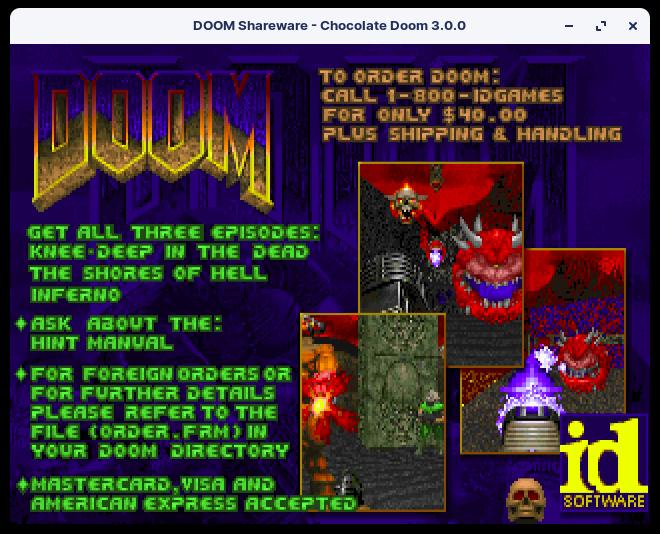
    In the game, this help screen appears when you hit F1:

    Screenshot of the Help screen in Doom (1993)

    What caught my attention was that you could buy Doom for $40 (USD) including Shipping & Handling. $40 was quite a bit of money back in those days, but it was not just a game – Doom was one heck of an engineering feat for the price.

    A little history — you can skip this part if you aren’t interested: Doom was developed back in 1993. When Doom was built, the game engine itself was entirely new and it was the first time the world has ever seen such real-time (pseudo-)3D graphics in a home computer. This was around the same time Intel launched the Pentium processor after its success with the 486. Let me repeat, in case it was not obvious: 66MHz was the fastest desktop CPU you could get at that time; your microwave oven probably has a faster CPU today. Games these days rely heavily on layers of technologies built over the years — hardware GPUs, 3D libraries/APIs (like DirectX/OpenGL), and game engines (like Unity). There were no such things back in 1993. Graphics in Doom is purely CPU-rendered.

    But if I went to my parents back in 1993 and asked for $40 to buy the game, my parents would have gone:

    “SIAO AH?”

    This was what got me thinking: what was my son’s motivation behind paying for fancy clothes on his virtual character?

    My generation today have accepted that it is normal to buy games. The transaction rewards the buyer with entertainment (playing the game), and the seller for their efforts (creating the game.)

    30 years ago, my parents would have been paying for something that their parents (i.e. my grandparents) would have thought were simply a waste of money. 30 years from now, our kids will be paying for something that we thought was nuts today.

    I was initially skeptical, but Mark Zukerberg may be up to something with this whole Metaverse thing. The technology is probably a bit too early for its time. Something must first exist to bridge the gap, and I think it might be in the form of an immersive, social-gaming app.

    Another thing: There’s some misconception that the Metaverse is/needs Virtual Reality (VR); VR is one of many technologies that will enable us to live in the Metaverse, but it’s not the only technology. It is likely true that huge advancements in Virtual Reality (VR) or Augmented Reality (AR) technologies will enable more immersive and engaging metaverse experiences. The VR headsets we have today are akin to the PCs in the 1990s running pixelated 3D games: It looks crappy and uncomfortable to wear, and is sort of at the edge of getting better with graphics looking quite decent, but in due course the hardware size, performance and quality will likely catch up.

    The fact though, is that some aspects of this Metaverse is already here. Think about where people are spending more time and money.

    What does the future look like then?

    Think about a world where the digital resources becomes even more convenient and easy to access; think about the walls of your homes simply made of large digital screens where you could do anything you wanted – meet a friend, go to work, pull up a photo; think about getting into a train but being in a virtual world where you could still talk to your kids at home… or on Mars?

  • Open Source Primary and Secondary Educational Resources

    Open Source Primary and Secondary Educational Resources

    Can Primary, or even Secondary education materials in Singapore be made Open Source so that educators or even members of the public contribute and consume freely? Can and should such education materials be made free and open for all?

    What triggered me was the need to sign up for an account before I could even browse the booklist at an appointed book store for my child’s Primary school. After glancing through the list of books, it’s clear that only a few handful of publishers monopolize this entire market.

    I recall having gone through much of my youth depending on many external/supplementary resources including the famous “10-year series” as well as various other exercise books, notes, etc.

    When I went to Polytechnic where I was given a choice of my own, I did not buy a single textbook after my first year and instead relied on lecture notes (which were annoyingly only for purchase at the school’s printer) and additional material either on the Internet or the library for most of my studies.

    I also recall books getting stolen, because people who didn’t bring them didn’t want to get punished, so the stole others’. I also recall ripping apart super thick books by chapter so we would carry less weight around to school, and then getting scolded for it because defacing a textbook was an offence. (For the youngsters who don’t understand: back in those days we carry every single book to school every day – there were no lockers and we can’t leave them under our desks. The idea was that if we left the books in school, we don’t study them at home.)

    Long story short, my personal experience with textbooks hasn’t been great; if textbooks were perfect, our teachers wouldn’t need to come up with additional materials and creative ways to teach.

    Imagine a world where we could opt for books in print or PDF. Imagine a world where we could just print only the chapters we wanted. Imagine a world where if your child saw a typo error could just submit an edit back, and maybe even get recognized for it. Imagine a world where if we needed to see a newer or older version of a book we could simply download a different PDF, or look at a specific git tag? Imagine a world where underprivileged families wouldn’t have to get sponsorship to buy textbooks, but instead go and print a chapter they need at a community center?

    I’m sure every year thousands of educators create content that would have made our materials much better and more up-to-date if it were contributed back to a central, open, textbook. Our education ministry MOE can then act as the maintainer of the project – to curate and validate content before accepting it mainstream.

    Question is, where and how to start? Can our education ministry drive this? Can we see in 5, 10 years that Singapore has built such a strong Open Source resource that we have other countries use and also contribute back?

    Further reading: https://en.wikipedia.org/wiki/Open_educational_resources